Your Built-In AI Assistant
Just Ask NovoNote is NovoNote’s in-platform assistant designed to support clinicians with documentation, reflection, and evidence-based thinking.
Rather than functioning as a simple chatbot, JAN acts as a clinically informed partner, helping you explore ideas, review sessions, and generate documentation while keeping you in full clinical control.
JAN can assist with tasks such as:
Drafting letters, summaries, and documentation
Creating worksheets or client handouts
Reviewing session transcripts and identifying themes
Exploring treatment approaches or modalities
Finding and understanding psychometric assessments
Thinking through ethical or professional dilemmas
Analysing patterns across therapy sessions
You simply ask a question in natural language, and JAN determines which internal tools or data sources to use to respond.
The Three-Step Workflow
JAN is designed to integrate naturally into clinical workflow.
Step 1 - Open the Dialogue
Access JAN instantly from:
- the NovoNote homepage
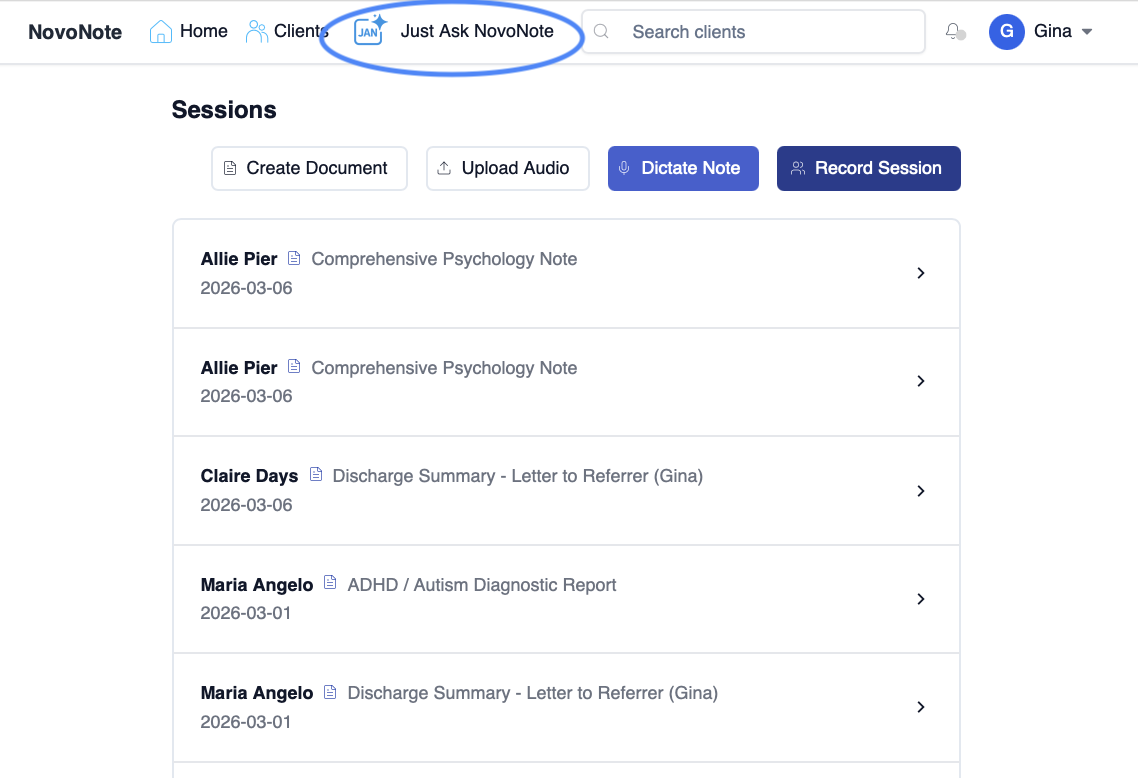
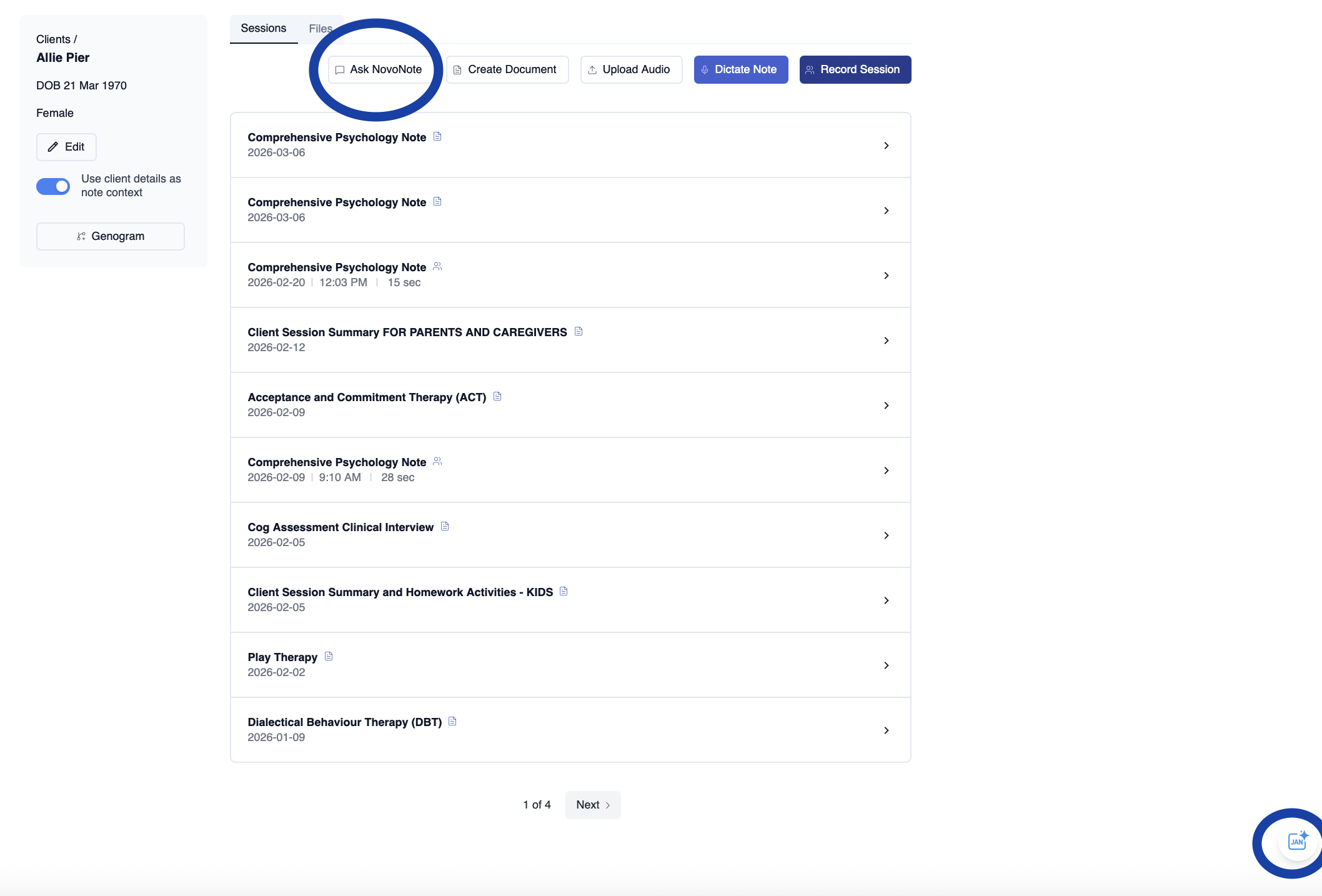
- Or a client's profile (in 2 spots)
- a specific therapy session
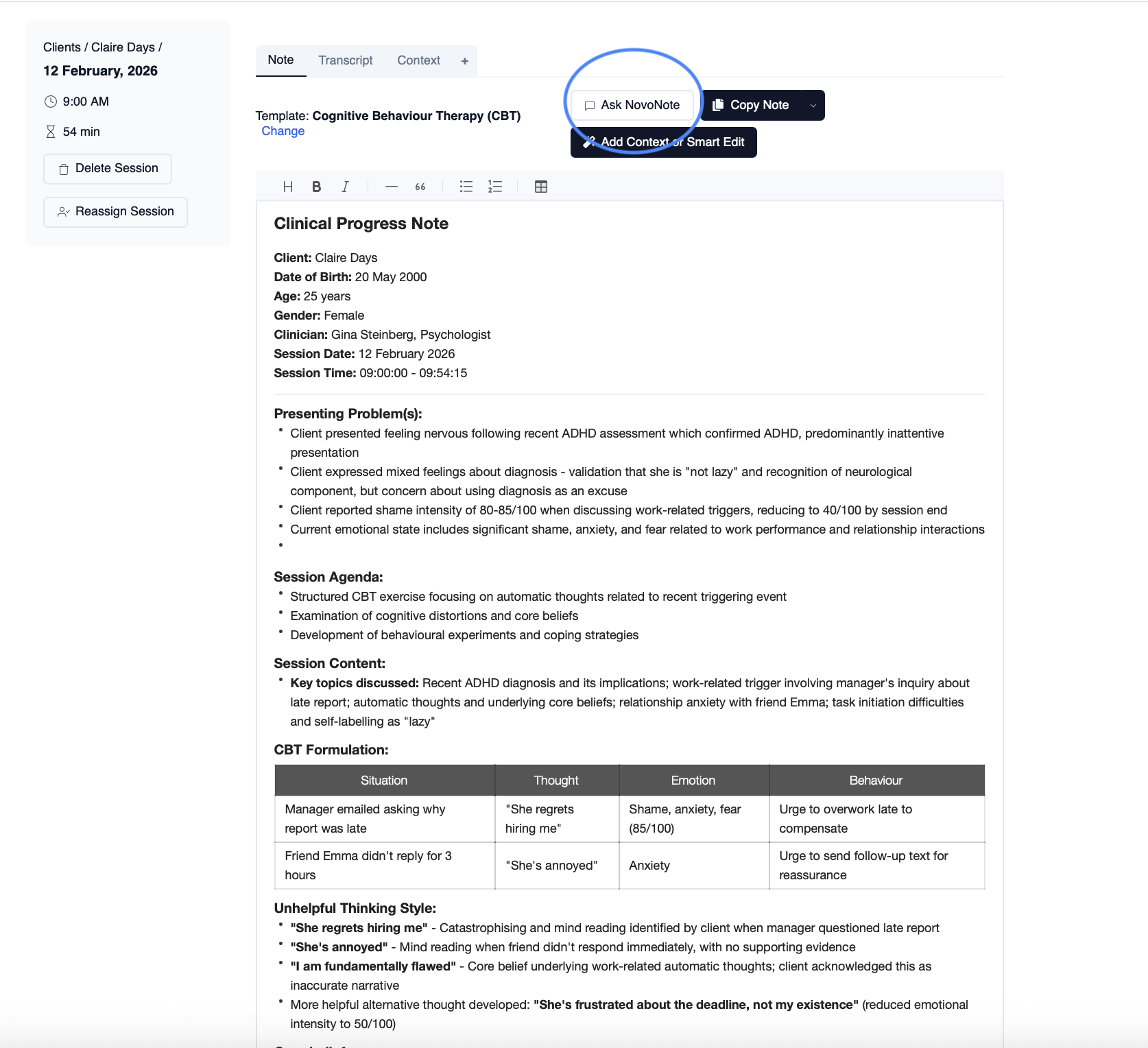
No setup is required. JAN is already securely connected within NovoNote.
Step 2 - Explore & Develop Ideas
Chat with JAN to:
- synthesise session history
- explore clinical ideas
- create worksheets or handouts
- review session transcripts
- reflect on your therapeutic work
You can refine ideas through an interactive dialogue, using JAN as a reflective partner to uncover deeper clinical insights.
Step 3 - Enhance Care & Documentation
Once JAN generates a response, you can:
convert it into a clinical note
export it as a document or letter
save it within the client record
You remain fully in control of reviewing, editing, and finalising all documentation.
Where You Can Use JAN
JAN’s capabilities depend on where you open it within NovoNote.
Homepage (General Clinical Support)
When opened from the NovoNote homepage, JAN functions as a general clinical assistant.
In this mode, JAN does not have access to client data.
You can use it to:
draft letters or documents
create worksheets or handouts
explore treatment approaches
research clinical questions
search the psychometric assessment library
think through ethical dilemmas
Example prompts:
“Create a CBT worksheet for challenging negative thoughts.”
“Draft a GP letter summarising therapy progress.”
“What assessments could help measure adolescent anxiety?”
“Help me think through an ethical dilemma about confidentiality.”
Export Options
From the homepage you can:
copy the response
download it as a Word document
download it as a PDF
add the output to a client's notes
This allows you to generate resources and later attach them to a client file.
Client Profile (Client-Specific Context)
When JAN is opened from within a client’s profile, it gains access to that client’s existing NovoNote data.
This allows JAN to analyse:
therapy session transcripts
clinical notes
case formulations
psychometric assessment results
session statistics
Example prompts:
“Summarise the key themes from the last three sessions.”
“What goals have been discussed with this client?”
“What treatment modalities might be relevant for this presentation?”
“What assessments might help monitor their symptoms?”
Responses generated here are automatically associated with that client’s record.
Session Level (Session-Specific Analysis)
When JAN is opened inside a specific therapy session, it focuses only on that session’s information.
This includes:
the session transcript
the clinical note for that session
related session data
Example prompts:
“Summarise the client’s main concerns in this session.”
“What coping strategies were discussed?”
“Quote what the client said about their sleep difficulties.”
“Identify key themes from today’s session.”
This can be useful for:
session reflection
preparing for the next appointment
quickly reviewing important moments from a session.
Exporting and Saving JAN Outputs
JAN responses can easily be reused in your clinical workflow.
Depending on the context, you can:
copy the response, by clicking the "Copy" button
download it as a Word document (.docx), by clicking the "Copy" button
download it as a PDF, by clicking the "Copy" button
add it to a clinical note or document, by clicking the "Add to Note" button
convert or attach it to a client record, by clicking the "Create New Note" button
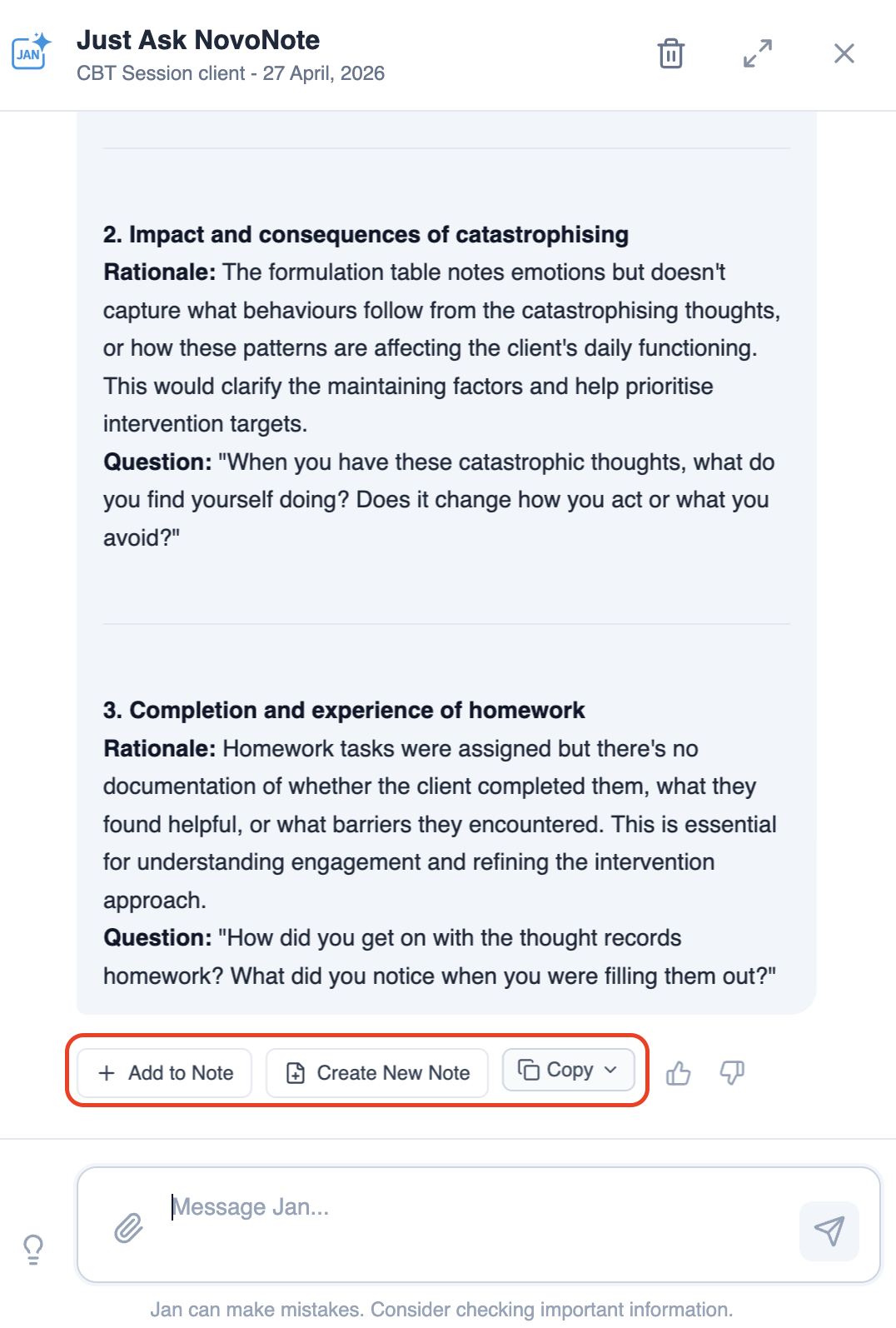
All outputs are drafts, allowing you to edit and refine them before saving.
The JAN Differentiator
JAN is designed specifically for clinical practice.
Clinical Context
JAN’s responses are grounded in the client’s existing NovoNote data - including transcripts and notes, allowing it to provide responses that reflect the client’s therapy history.
Uncompromising Data Stewardship
Client data is handled with strict ethical responsibility, and you don't need to export data into a less secure third party platform such as ChatGPT. Everything stays securely within NovoNote.
Confidential clinical data is never used for model training, ensuring privacy and compliance with regulatory standards.
A Foundation in Evidence
JAN operates with an understanding of psychological and psychiatric theory, research, and clinical practice standards. It functions as a reflective partner, helping clinicians apply evidence-based thinking to individual cases.
Engineered for Professional Accountability
JAN does not replace clinical judgement.
No diagnosis: JAN does not diagnose clients or prescribe treatment plans.
Draft-only outputs: All responses are intended for clinician review and modification.
You retain full professional responsibility and control.
What JAN cannot:
- Provide diagnoses
- Provide supervision
- Provide therapy or communicate with your clients
- JAN cannot do anything that you don't ask it to do, and it won't do some things, even if you do ask it to (such as discussing things that are not related to evidence based-mental health treatment).
Tips for Getting the Best Results
To get the most useful responses from JAN:
ask specific questions
mention timeframes when relevant
use clinical terminology when searching assessments
ask follow-up questions to explore further
allow the client or session context to guide the response.
Important Note
JAN is designed to support professional thinking and workflow efficiency.
While it can assist with analysis, documentation, and reflection, clinicians should always review and apply their own professional judgement before using generated content in clinical practice. Given the nature of AI, JAN will make mistakes, so please check all output for accuracy.
Learn More
Was this article helpful?
That’s Great!
Thank you for your feedback
Sorry! We couldn't be helpful
Thank you for your feedback
Feedback sent
We appreciate your effort and will try to fix the article