As mental health professionals, maintaining control over documentation is essential for ethical practice, confidentiality, and accuracy. Whether you need to delete a note due to errors, outdated information, or privacy considerations, NovoNote AI Scribe gives you clear options for securely removing session notes and transcripts.
There are 3 ways to delete notes and transcripts:
- By deleting both notes and transcript in a session
- By deleting just the transcript of a session
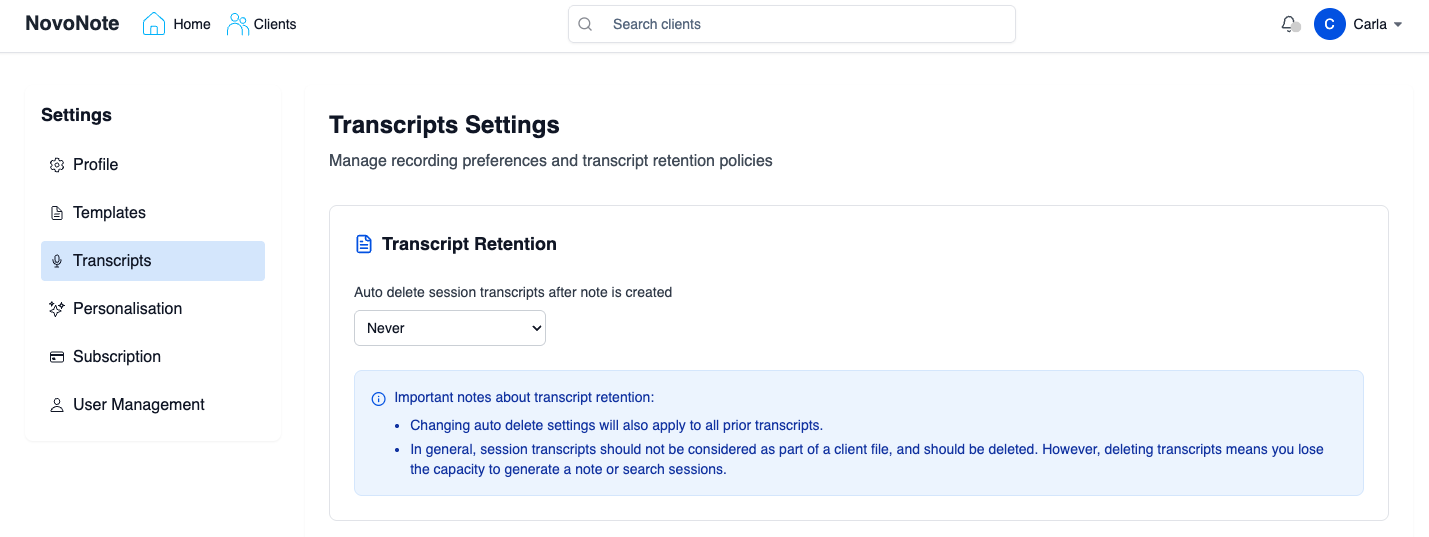
- By auto-deleting all existing and new transcripts after a set duration in the Account Settings
Deleting Both Notes and Transcript in a Session
1. Select the specific session from your NovoNote Home page or the client's profile.
2. Select "Delete Session":
- Note: This will permanently delete the session and all associated data, such as the Notes and Transcripts. The client profile will remain, as well as any other sessions under the client.


Deleting the Transcript of a Session
Use this option when the session note is correct and finalised, but the transcript is no longer needed or should not be retained.
1. Select the specific session from your NovoNote Home page or the client's profile.
2. Select the "Transcripts" tab and then "Delete Transcript":
- Note: This will permanently delete the transcript for this session - the Note will still remain attached to the session. However, you will not be able to regenerate the Note using a different template.

Auto-Deleting Transcripts
If you prefer all transcripts to be retained only briefly or not at all, you can enable automatic deletion.
1. On your NovoNote Home page, open the dropdown menu next to your name (top right):

2. Select "Transcripts" from the dropdown list:

3. Choose your preferred auto-delete timeframe from the drop-down menu; options range from one hour to 7 years, or never.
- Important: This will apply to all transcripts, including previous or existing transcripts.
Quick Demo: A 90-second walkthrough of all deletion options in NovoNote.
Was this article helpful?
That’s Great!
Thank you for your feedback
Sorry! We couldn't be helpful
Thank you for your feedback
Feedback sent
We appreciate your effort and will try to fix the article