When your subscription renews, payments will be processed automatically from the payment method on file (e.g., Visa, Master card). In NovoNote, you can easily access and download your invoices and receipts directly from your account settings.
Accessing Invoices/Receipts from NovoNote
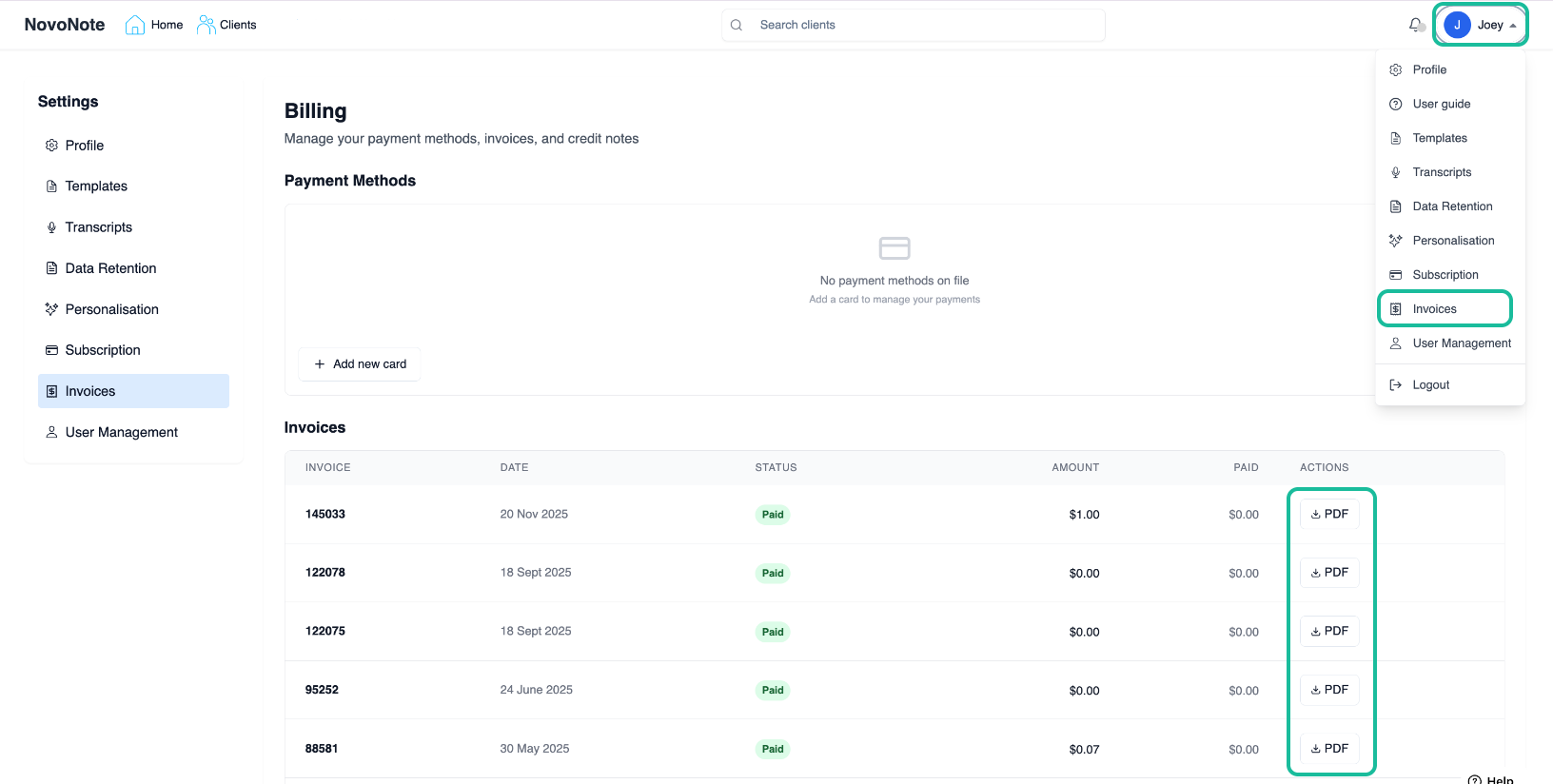
1. Open Profile Menu: On your NovoNote account, click on your name on the top right corner.
2. Find Invoices: Select "Invoices", which all of your past billing/transactions will be listed.
3. Download PDF: Click on the "PDF" symbol next to the relevant invoice to save your tax receipt. A separate tab containing the PDF will be opened for you to view or print.
Also see:
Need Further Assistance?
If an invoice is missing or if you have questions regarding billing, our team is here to help.

Contact Us: info@novopsych.com.
Was this article helpful?
That’s Great!
Thank you for your feedback
Sorry! We couldn't be helpful
Thank you for your feedback
Feedback sent
We appreciate your effort and will try to fix the article